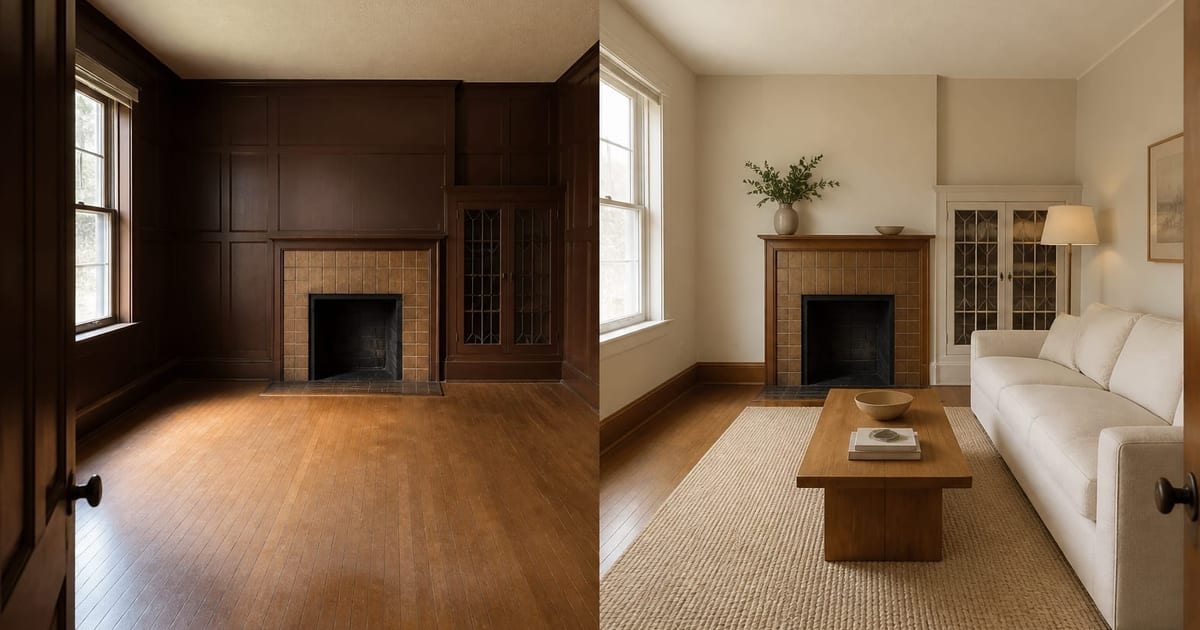
AI room design from photo works by using your uploaded image as the spatial reference, then restyling the visible room with new paint, furniture, lighting, materials, and decor. The best use case is not moving walls or inventing architecture; it is previewing realistic changes while keeping the room's walls, windows, doors, floor plane, and perspective recognizable. Treat the output as a fast visual decision aid before samples, measurements, and professional work.
What should stay fixed in an AI room design from photo?
The fixed layer should be the architecture and camera perspective: walls, windows, doors, ceiling line, floor plane, stairs, built-ins, radiators, and major openings. If those features disappear, the render may look prettier but it becomes less useful. ReDesign's strongest prompt pattern is to name what must stay: "preserve the walls, windows, doors, floor, and perspective; redesign the furniture, lighting, paint, rug, and styling." Compare the result against the best AI interior design apps, use the photo checklist for AI design, and try the same constraint-led method for AI landscape design from photo.
What is AI interior design and how does it actually work?
AI interior design is a class of image-generation tools that takes a photo of a real room and produces a redesigned version of the same room. Behind the scenes the system locates the architecture in your photo — walls, windows, ceiling lines, the floor plane — and treats those as fixed reference points, then redraws the paint, furniture, fabrics, lighting, and decor on top. The output is a still image, not a 3D model, and it should be read like a redesigned photograph, not a contractor drawing.
The tools that perform best on real homes work from your photo, not from a generic empty-room template. That distinction matters. A render generated from a blank box can show a beautiful Scandinavian living room; only a render generated from your own off-square 1940s living room with the awkward radiator on the side wall will tell you whether that Scandinavian direction works in the space you actually own. Re-Design uses your photo as the spatial anchor, which is why the photograph-spaces-for-ai guide matters more than the prompt you write.
Most first-time users overestimate what a single upload will produce. A typical session is closer to 4 or 5 prompts on the same photo, each refining one layer — paint, then furniture, then lighting, then the rug. A vague prompt like "make it modern" produces a generic answer; a prompt like "warm minimalist with a 9 ft cream sofa, oak coffee table, and a 2700K floor lamp in the reading corner" produces something worth showing a partner.
What AI interior design is good at, and what it is not
The honest version of this story is a capability and a limit, side by side. AI interior design is now good enough to replace most inspiration scrolling for a homeowner who already knows the room they want to change. It is not yet good enough to replace a kitchen designer drafting a $40,000 cabinet plan. The useful zone is wide; the gap matters.
The table below names the work AI design actually does well today, the work it does poorly, and a use-case verdict for each.
| Use case | AI design today | Verdict |
|---|---|---|
| Paint color and finish testing | Excellent — fast, accurate to undertone | Use as primary tool, then confirm with a $5 swatch. |
| Furniture style and arrangement | Strong — placement reads believable | Use to test 3 directions before buying anything over $300. |
| Lighting fixture swaps | Strong on style, weak on lumen output | Use to choose the look; size separately with a lighting plan. |
| Soft goods and styling | Excellent | Use freely — almost no downside. |
| Cabinetry and built-ins | Mixed — stylistically right, not buildable | Use for direction; hand the render to a fabricator. |
| Exterior elevations | Mixed — same camera issues as outdoor photos | Possible, but the photo discipline matters more here. |
| Moving walls or windows | Weak — render shows it; reality does not allow it | Do not rely on. Run a real plan check first. |
| Exact dimensions and clearances | Weak — pixels, not units | Always cross-check with a tape measure. |
One pattern worth naming: AI design is best on rooms you have already lived in long enough to know what bothers you about them. The tool gives a fast answer to "would this color help?" It cannot give a useful answer to "what should I do with my house?" That is still a designer question.
Test AI room design from your own photo before you buy paint, furniture, or lighting. Three transformations on one upload usually settles the direction faster than a week of Pinterest.
Common AI interior design mistakes to avoid
The first mistake is uploading a bad photo and blaming the tool for the result. AI design needs eye-level framing, even daylight, and at least one full wall, ceiling, and floor in shot. A phone shot taken from chest height into a sunlit window will produce a distorted render no matter how good the prompt is. The 5-minute photo fix is worth more than a week of prompts.
The second mistake is treating the first render as the answer. The first render is the sketch; the third or fourth is the candidate. Run the same upload through 3 to 5 specific prompts that change one variable each — paint only, then sofa only, then lighting only. The renders compound; the answer emerges from the comparison.
The third mistake is over-trusting dimensions. The render shows a sofa that looks the right size; the room is 11 ft wide. Use a tape measure before you order a 9 ft sectional based on a render. The same caution applies to clearances around walkways, door swings, and refrigerator doors.
The last mistake is using AI design to choose what you should change, instead of testing what you already know you want to change. The tool excels when you arrive with a hypothesis and fails when you arrive with a question. The second question still belongs to a designer.
Use AI design to preview your next change before you commit
The most useful workflow is short. Take one photo of the room from the doorway at eye level. Upload it once. Run three prompts on the same upload: one that tests a paint shift, one that tests a furniture move, one that tests a lighting change. Compare the three renders side by side and pick the direction worth pursuing. Then take that direction into a sample order — a swatch, a chip, a rug corner — and confirm with your eyes in the actual room.
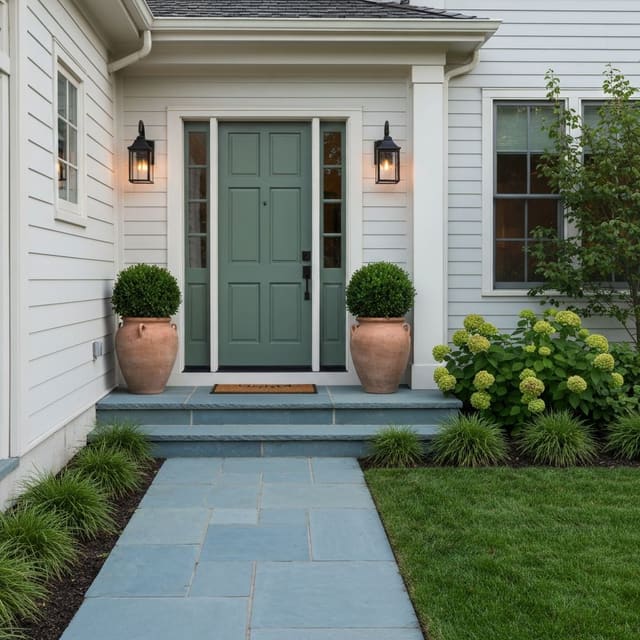
This is the loop Re-Design is built for, and it is the part of the process designers usually charge $200 an hour for. The tool will not replace the designer on a major build, but it will close most of the inspiration-to-decision gap for paint refreshes, furniture swaps, and the test renders that make a contractor bid easier to negotiate. Reference curb-appeal ideas for a worked example of the same loop applied to the front of a house.
Frequently Asked Questions
Does AI room design from photo keep the original room structure?
It should, but only if the tool and prompt are built for photo-first redesign. Ask the tool to preserve walls, windows, doors, ceiling line, floor plane, and perspective, then judge the output against the original photo. If the render moves architecture or hides the awkward feature you need solved, rerun it with stricter instructions.
What photo gives the most accurate AI room design?
Use one level, eye-height photo with the floor, ceiling line, and at least one full wall visible. Avoid ultra-wide lenses, heavy backlight, cropped corners, and clutter blocking the fixed features. The cleaner the spatial reference, the more likely the redesign will respect the actual room.
Does AI interior design work on outdoor photos?
AI design works on outdoor photos but with a wider error margin than indoor shots. Outdoor scenes have more variable lighting, no fixed ceiling line, and a deeper depth of field, all of which make the tool less precise. Use it for big-picture style direction on a patio, deck, or front yard, and rely less on it for exact paver counts or planting quantities. Shoot in flat afternoon light, not midday sun.
Will AI design move walls in my room?
A render may appear to move a wall, but you cannot. The tool is composing an image, not editing a floor plan. Treat any render that appears to relocate a window or remove a structural wall as inspiration only, never as a permission slip. Real wall moves require a plan check, a contractor, and often a permit. Use AI design for the cosmetic layer and a designer or architect for the structural one.
How accurate is the perspective in an AI design render?
Perspective is the single weakest part of most AI design renders. If your upload has any lens distortion — phone shots at chest height, wide-angle frames, doorway shots that lean — the render will inherit and amplify that distortion. Shoot at eye level with a standard phone lens, hold the phone level, and keep one full wall flat in frame. That alone fixes most perspective complaints.
How much does AI interior design cost?
Free tiers exist on most AI design apps, including Re-Design, with limits on monthly renders. Paid tiers usually start around $10 to $25 per month and unlock more renders, higher resolution, and faster turnaround. Compared with a designer consultation at $200 to $400 an hour, the math favors AI for the inspiration and direction stage; the designer still wins for buildable plans, sourcing, and on-site project management.
Can AI design replace an interior designer?
For an inspiration-to-direction loop on paint, furniture, and styling, AI design now does the work many homeowners used to hire a designer for. For a full renovation — kitchen reconfigurations, additions, custom millwork — a designer still wins. Use AI to arrive at the designer meeting with a clear direction and three renders. The conversation moves twice as fast and the bill is usually smaller.