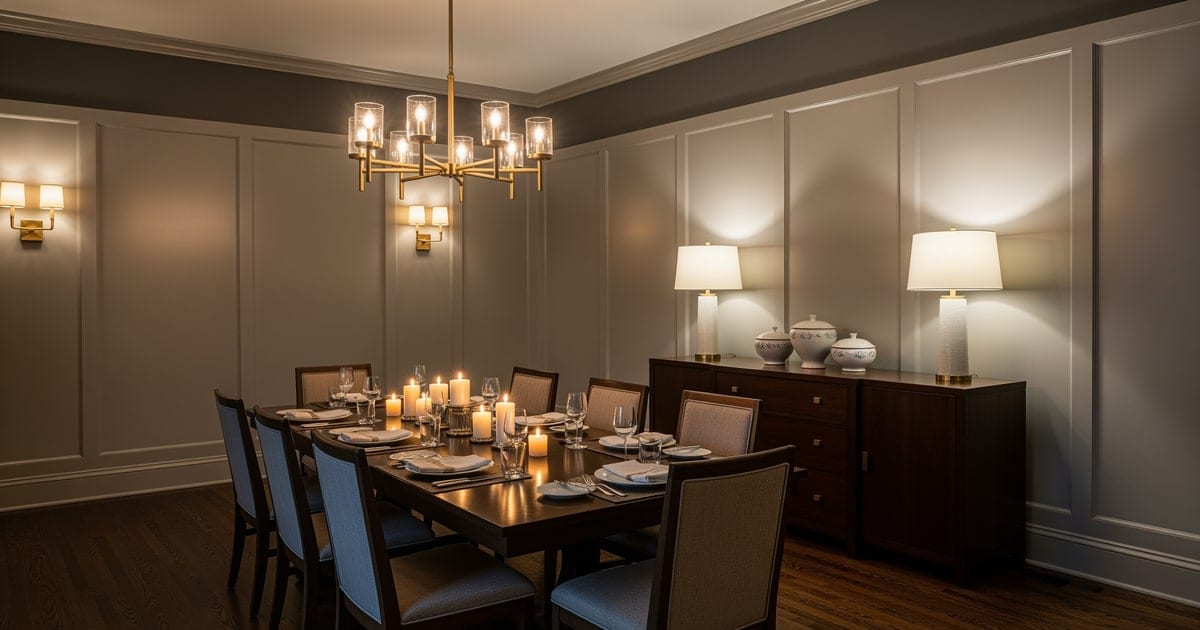
AI dining room design works by uploading a photo of the room, locking the chandelier centerline and sideboard wall, and previewing table size, chair count, and rug-under-table coverage before any purchase. Dining rooms are the easiest interior to overspend on and the hardest to second-guess after delivery. A dining table is expensive, heavy, custom-sized, and almost never returnable; chairs come in sets of six and arrive in unmatched undertones; the rug never looks the same in the room as it did online. My opinion is blunt: dining rooms are a near-perfect use case for AI design because the variables are small in number, expensive when wrong, and easily previewed from a single photo.
Can AI redesign a dining room from a photo?
Yes. AI dining room design works by analyzing a photo of your existing dining room and generating a redesign of the same room with new table shapes, chair styles, rugs, lighting, wall treatments, and styling — while keeping the room geometry, windows, and doorways intact. The strongest workflow is to upload one wide photo from the doorway, run two or three versions with one variable changed each time (rectangular versus round table, chairs versus bench, chandelier versus linear pendant), and use the side-by-side comparison to choose what to buy. AI does not need a floor plan or a designer; it needs a clear photo and specific prompts about what to keep and what to change.
What AI dining room design does well
Dining rooms have few variables and high stakes; AI is excellent at the calls that decide whether the room reads calm or busy.
- Table shape preview. A 72-inch rectangle, an 84-inch oval, and a 60-inch round read completely differently in the same room — different traffic lanes, different sightlines from the kitchen, different chair counts. Even a 6-inch difference in table length changes whether two chairs fit at the end.
- Chair style comparison. Six matched parsons chairs, four armchairs plus a bench, mixed wood-and-upholstery pairs, and cane-back chairs all change the room's formality. AI shows which fits the room's bones — paneling, ceiling height, window placement — rather than which looks best in isolation.
- Rug sizing trial. A rug must extend at least 24 inches past every table edge so chairs stay on the rug when pulled out. AI will show a too-small rug versus a properly sized rug, and the difference is dramatic on screen. The rules in area rug sizing mistakes translate directly.
- Lighting scale and type. A 12-inch chandelier in a 12-foot-wide room is visually undersized; a 36-inch chandelier over a 60-inch round is correctly scaled. AI also shows linear pendants over a long rectangle and the impact of 2700K versus 3000K bulbs. If the room currently runs on one underwhelming overhead, the moves in dim dining room lighting fix pair well.
- Wall treatment trial. Wainscoting, picture-frame molding, a single accent wall, large-scale art, or a mirror that doubles a window — all easy to preview before paying a carpenter.
Smaller dining-finish moves AI handles well
- Bench seating on the window side — pulls the room toward casual without losing capacity.
- A pair of matching armchairs at the heads plus armless chairs along the sides — reads collected, not matchy.
- A linear three-bulb pendant over a long rectangular table — the right scale almost every time.
- Picture-frame molding at chair-rail height on the long walls — a quiet upgrade that doubles the room's perceived budget.
Test this on your own room photo with ReDesign before you choose the final direction; keep the doorway, walls, windows, main furniture, lighting, and awkward fixed features visible so the preview solves the room you actually have.
What AI dining room design does badly
The render captures shape and material well, but it routinely misjudges dimensions and adjacencies. Verify the constraints offline.
- Table scale is the most frequent miss. AI may shrink a real 84-inch table to look like a 60-inch, or stretch a small drop-leaf into a banquet table. Verify dimensions against the spec sheet before buying.
- Chair count is often wrong. AI may show eight chairs around a table that physically seats six. Use the 24-inch-per-seated-person rule along each side of the table to verify capacity.
- Chandelier height looks generous on screen and dramatic in person. Hang at 30-34 inches above the tabletop for an 8-foot ceiling, 36 inches for a 9-foot ceiling. Trust the spec, not the render.
- Rug pattern, especially vintage and Oriental styles, often comes back hallucinated. Use AI to test rug scale and color saturation; shop the actual pattern from a real rug seller.
- Open-plan transitions are tricky. If your dining room flows into a kitchen or living room, AI may render the dining zone in a style that fights the adjoining space. Include the kitchen or living-room edge in the frame.
How to use Re-Design for a dining room preview
Be specific about what stays and what changes. The dining room is small enough that a vague prompt produces a generic render.
Example prompt: "Keep the existing built-in china cabinet, the window placement, and the wood floor. Replace the table with an 84 inch oval walnut table. Replace the six chairs with four cane-back armless chairs along the sides and two cane-back armchairs at the heads. Add a 5x8 wool rug with a low-pile flatweave in warm cream. Hang a 30 inch linear pendant with three bulbs centered over the table at 32 inches above the tabletop. Repaint the walls in warm white. Add picture-frame molding at chair-rail height on the long walls."
If the dining room is small or narrow, every inch matters. Pair the AI preview with the specs in narrow dining room ideas — bench depth, table width, sconce height — and let the preview show you which set of moves actually works.
Common AI dining-room design mistakes
- Trusting the render's dimensions instead of the manufacturer's spec sheet.
- Running one preview instead of two or three with one variable changed.
- Ignoring the rug-size rule and ordering a 5x7 for a setup that needs an 8x10.
- Letting the AI choose a chandelier scale — the room reads as undersized even when the table fits.
- Cropping the kitchen or living-room edge out of the photo so the preview ignores the open-plan adjacency.
- Buying chairs from the render without sitting in a sample first — comfort is invisible on screen.
- Forgetting to verify chair count against the 24-inch-per-seat rule.
Use AI design to preview your dining room before you buy
Dining rooms reward decisions made on a screen instead of on a delivery dock. Photograph the room from the doorway, lock the room's geometry in the prompt, change one variable at a time, and use the comparison to commit. The dining table you eventually buy should look exactly like the one you previewed — not because the render is a contract, but because the preview is the cheapest way to make a confident decision.
Frequently Asked Questions
Can AI design a dining room around an existing chandelier?
Yes — lock the chandelier centerline in the photo and the AI previews table lengths that center under the fixture, so a 72-inch fixture pairs with a 78-90 inch table rather than a 60-inch one. Use the room photo to compare the visible layout and fixed constraints before committing, because door swings, windows, outlets, storage reach, circulation, and existing furniture decide whether the idea survives daily use.
How does AI handle dining table size against chair clearance?
AI previews table footprints with a 36-inch chair pull-back zone, so an 8-foot room with a 78-inch table reads tight while a 9-foot room reads comfortable; the photo geometry drives the math. Keep the preview honest by leaving the problem area visible in the frame, then compare one conservative version against one bolder version before you buy lighting, paint, furniture, or storage.
Can AI preview a rug under the dining table?
Yes — preview rugs sized to clear chair legs at full pull-out, typically 8x10 or 9x12 under a 72-78 inch table, so back legs stay on the rug when seated. Check the result against ordinary movement first: drawer clearance, chair pullout, walkway width, glare, switch access, and sightlines matter more than a perfect catalog angle.
What if my dining room doubles as a passthrough hallway?
Use AI to test a single-side-seating layout against the sideboard wall — preview a 36-42 inch table depth with chairs only on the window side so the hallway path stays clear. Use the image to narrow priorities and measurements before ordering anything custom; final purchases still need real dimensions, outlet locations, installation limits, and product clearances.
Should AI design happen before or after picking the chandelier?
Pick the chandelier first if it is the focal piece; lock that fixture in the photo and design the table and rug around it. If the chandelier is undecided, design the table first and the AI suggests fixture sizes that fit the table footprint. If the preview invents architecture or hides the awkward feature you need solved, rerun it with stricter instructions so the result remains tied to your actual room.
> Try this: Ready to see this on your own room? Open ReDesign and run the preview.
Three transformations to try
1. Dining room with 78-inch table and 8x10 rug centered 2. Hallway-dining single-side-seating layout 3. Round table with four chairs under fixture


