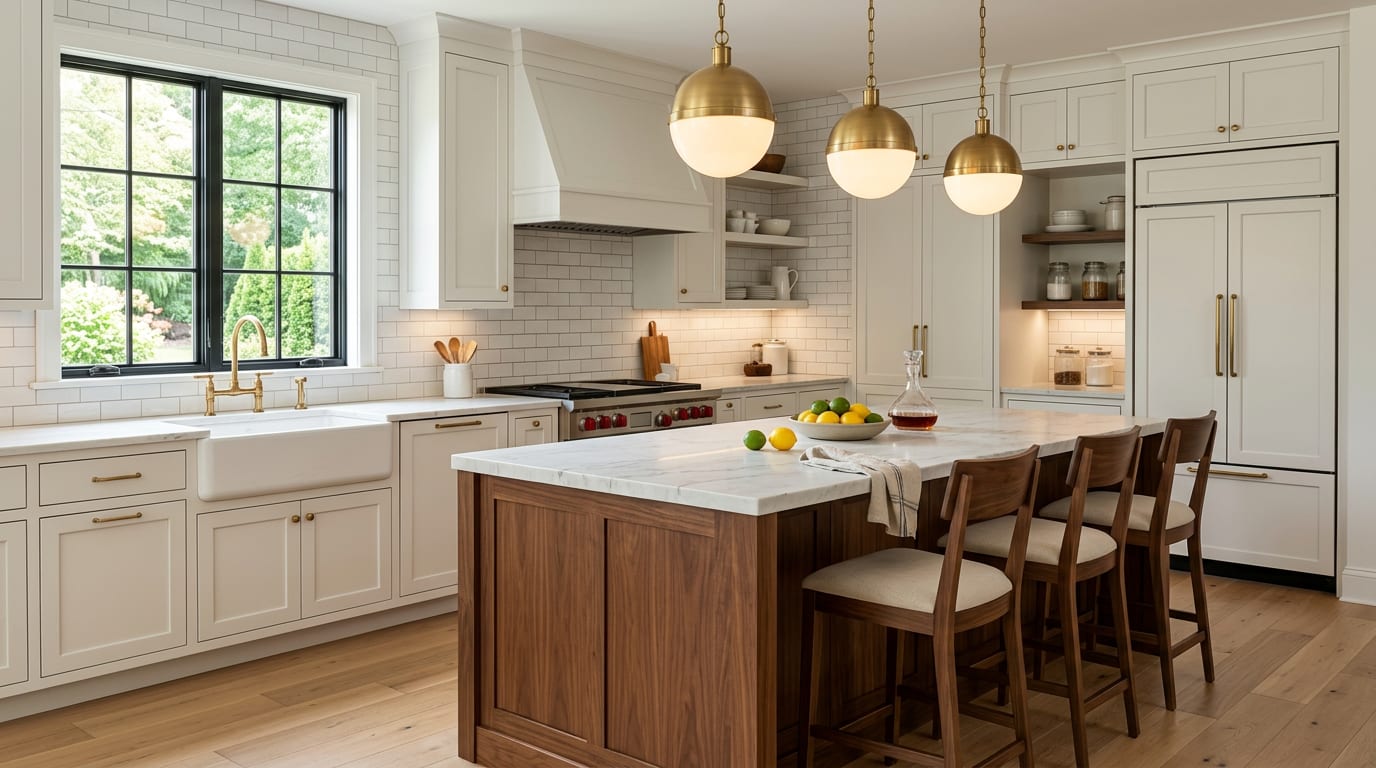
AI kitchen design ideas work by uploading a photo of the current kitchen, locking the cabinet box positions and plumbing wall, and previewing finish, color, hardware, and layout swaps without touching the bones. Kitchens are the room where confidence is bought, not borrowed. A homeowner who is sure about the cabinet color, the counter material, the hardware finish, and the lighting plan signs a contract; a homeowner who is guessing pays for changes. My opinion is blunt: AI kitchen design is most valuable not for inspiration but for resolving a few specific decisions that drive 80 percent of the spend — cabinet color, counter material, backsplash, and lighting — before any deposit is paid.
Can AI design my kitchen?
Yes. AI kitchen design generates a redesign of your actual kitchen by analyzing a photo and applying new cabinet color, counter material, backsplash, hardware, paint, and lighting while keeping the layout, appliances, and window placement intact. The strongest workflow is to upload one wide photo from the doorway with the full run of cabinets visible, then run two or three versions with one variable changed each time — for example, painted white shaker versus walnut slab cabinets, or honed marble versus quartz counters. The render does not replace a designer's spec sheet; it gives you the visual answer to the question that usually stalls a kitchen project.
What AI kitchen design does well
The room is large enough that the proportional relationships read clearly on screen, and the finish decisions all interact in ways that are nearly impossible to picture from sample chips. AI is excellent at the calls that drive the spend.
- Cabinet color preview against your real light. A painted white, a warm wood, a deep navy, a soft sage, and a true black all read differently in the same room. A color that looks safe in a showroom can read cold under your north-facing morning light or yellow under your existing warm bulbs. Test three against your real lighting and floor before paying for samples.
- Counter material comparison. Honed marble, polished quartz, a butcher-block island, and a soapstone perimeter all change the kitchen's temperature and formality. AI shows the same cabinet color paired with three counter materials side by side, and the version that calms the room is usually obvious.
- Backsplash scale check. A small mosaic, a 3 by 12 subway, an 18 by 18 slab, and a full-height slab to the underside of uppers each change the room's rhythm. The version that lets the cabinets breathe is usually the right one.
- Lighting layer test. A single overhead can, a row of pendants over the island, and a layered plan with under-cabinet plus pendants plus perimeter wash are dramatically different in person and impossible to picture from a fixture catalog. The geometry rules in task lighting kitchen placement translate directly into prompt language.
- Cabinet-versus-floor harmony. A dark floor under dark cabinets needs a brighter counter and backsplash or the kitchen collapses into a single tone. The moves in make a dark kitchen feel bright come alive in an AI preview because you can test them before painting.
Small kitchen-finish moves AI handles well
- Two-tone cabinets — painted upper, walnut or oak lower — read as collected instead of monolithic.
- A mitered island top with a 3-inch thickness reads custom without the cost of a slab waterfall.
- Unlacquered brass cup pulls on drawers with knobs on doors break the visual line cleanly.
- A 2700K bulb spec across every fixture — pendant, under-cabinet, and overhead — keeps the kitchen warm.
Test this on your own room photo with ReDesign before you choose the final direction; keep the doorway, walls, windows, main furniture, lighting, and awkward fixed features visible so the preview solves the room you actually have.
What AI kitchen design does badly
The render is not a contract. AI invents anything plumbing-adjacent and routinely misjudges proportions in ways that cost real money at install.
- Layout is hallucinated. AI may move an island, relocate a sink, or rearrange a refrigerator wall — all expensive in real life. Treat any layout change as a styling artifact, not a recommendation.
- Appliance proportions are usually wrong. AI may shrink a 36-inch range to read as a 30, or stretch a counter-depth refrigerator into a 48-inch built-in. Verify against the spec sheet before designing around them.
- Hardware finishes are reliably inconsistent. Brass, brushed nickel, matte black, and unlacquered brass each come back differently across renders. Lock the finish in the prompt and confirm with the real sample before ordering 30 pulls.
- Grout color is hallucinated more than it is rendered. Make grout a separate decision with a real grout sample on a real tile board.
- Counter overhang and edge profile are invented. A render will draw a 2-inch waterfall edge that adds two thousand dollars to fabrication. Lock the edge profile — eased, beveled, mitered — and confirm in writing with the fabricator.
How to use Re-Design for a kitchen preview
Be specific about what stays, what changes, and which fixed dimensions the project has to respect.
Example prompt: "Keep the existing range, hood, refrigerator, dishwasher, sink, window, and floor. Replace the cabinets with painted shaker fronts in soft white and walnut on the island. Replace the counters with honed marble on the perimeter and a 3 inch mitered walnut top on the island. Install a 3 by 12 white subway backsplash to the underside of the upper cabinets with light gray grout. Replace the hardware with unlacquered brass cup pulls on drawers and knobs on doors. Add three 12 inch globe pendants in unlacquered brass over the island at 32 inches above the counter. Add under-cabinet LED tape at 2700K. Repaint the walls in warm white."
Run a second version with one variable changed — for example, the same prompt with painted navy cabinets on the perimeter instead of soft white. The comparison usually shows which color is doing the calming work and which is fighting your floor. A third version with quartz instead of honed marble tells you whether the marble or the cabinet color is responsible for the soft feel.
Save the best version, screenshot the cabinet color, counter material, pendant height, and grout color, and walk those notes into the showroom. The preview turns a vague conversation into a concrete shopping list.
Common AI kitchen design mistakes
- Letting the AI rearrange the layout and getting excited about a kitchen you cannot afford to build.
- Trusting appliance proportions in the render instead of the manufacturer spec sheet.
- Picking a cabinet color that looks great in the render and clashes with your actual floor.
- Skipping a side-by-side counter comparison and committing to a single material on faith.
- Forgetting to lock the cabinet hardware finish — the render finish is rarely the real finish.
- Running only one preview per question instead of two or three with one variable changed.
- Cropping the floor or the adjacent dining or living area out of the photo so the preview ignores adjacency.
Use AI design to preview your kitchen before you buy cabinets
Kitchens reward homeowners who commit on screen before they commit on paper. Photograph the room from the doorway, lock the layout and appliances in the prompt, change one finish variable at a time, and use the comparison to decide. The cabinet color, counter material, backsplash, and lighting plan you end up with should match the preview you saved — not because the render is a contract, but because the preview is the cheapest way to make a kitchen decision that lives in your house for fifteen years.
Frequently Asked Questions
Can AI generate kitchen ideas without changing the layout?
Yes — keep cabinet box positions locked and AI previews cabinet color, counter material, hardware, and backsplash swaps that read as a refresh rather than a full remodel. Use the room photo to compare the visible layout and fixed constraints before committing, because door swings, windows, outlets, storage reach, circulation, and existing furniture decide whether the idea survives daily use.
How realistic are AI kitchen design previews?
Realistic for finish, color, and material decisions; less reliable for plumbing or appliance moves where field measurements and code clearances matter more than visual preview. Keep the preview honest by leaving the problem area visible in the frame, then compare one conservative version against one bolder version before you buy lighting, paint, furniture, or storage.
Can AI design a kitchen island into a current layout?
Yes — preview an island footprint against the existing counter run, but confirm a 42-48 inch aisle on all sides before committing; AI shows the visual fit, the tape measure confirms the function. Check the result against ordinary movement first: drawer clearance, chair pullout, walkway width, glare, switch access, and sightlines matter more than a perfect catalog angle.
What kitchen photo gives the best AI preview?
A head-on shot from the entry doorway with the full cabinet run, sink wall, and one window visible; eye-level, daylight, no flash, and no people in frame. Use the image to narrow priorities and measurements before ordering anything custom; final purchases still need real dimensions, outlet locations, installation limits, and product clearances.
Should AI kitchen ideas drive a contractor scope?
Use AI to lock in the visual direction and finish palette before contractor walkthroughs; that shortens the design-build conversation and keeps the contractor scoping construction rather than aesthetics. If the preview invents architecture or hides the awkward feature you need solved, rerun it with stricter instructions so the result remains tied to your actual room.
> Try this: Ready to see this on your own room? Open ReDesign and run the preview.
Three transformations to try
1. Refresh kitchen with cabinet color + hardware swap 2. Kitchen with island added against existing run 3. Counter + backsplash material swap preview


