AI laundry room design previews stacked versus side-by-side machines, counter depth, cabinet runs, sink placement, and lighting on one uploaded photo so a utility closet becomes a usable room before any cabinet ships. A homeowner spends $12,000 on cabinets and a folding counter and ends up with a room that still feels like a closet because the lighting is wrong, the counter is too shallow to fold a queen sheet, and the upper cabinets are too high to actually reach. My opinion is blunt: laundry rooms reward AI design more than almost any other utility space because the variables are small in number, easy to preview, and expensive to get wrong.
Can AI redesign a laundry room?
Yes. AI laundry room design generates a redesign of your existing laundry room by analyzing a photo and previewing new cabinet runs, counter material and depth, washer/dryer configuration, drying solutions, sink choices, paint, and lighting — while keeping the plumbing and venting locations intact. The strongest workflow is to upload one wide photo from the doorway with the appliance wall visible, then run versions that change one variable at a time: stacked versus side-by-side, full cabinet wall versus open shelves above a counter, or a single base cabinet versus a base cabinet plus a hanging rod. AI does not solve plumbing relocations or vent runs, but it solves every finish and layout question that decides whether the room is usable.
What AI laundry room design does well
The room is small enough that the proportional relationships in a render are usually right, and the finish decisions all interact in ways that are easy to miss from sample chips. AI is excellent at the trade-offs.
- Stacked versus side-by-side appliance preview. A stacked washer/dryer frees a full base cabinet's worth of floor space and changes the room from a one-task utility room into a multi-task workroom. Test both configurations in your real wall before committing.
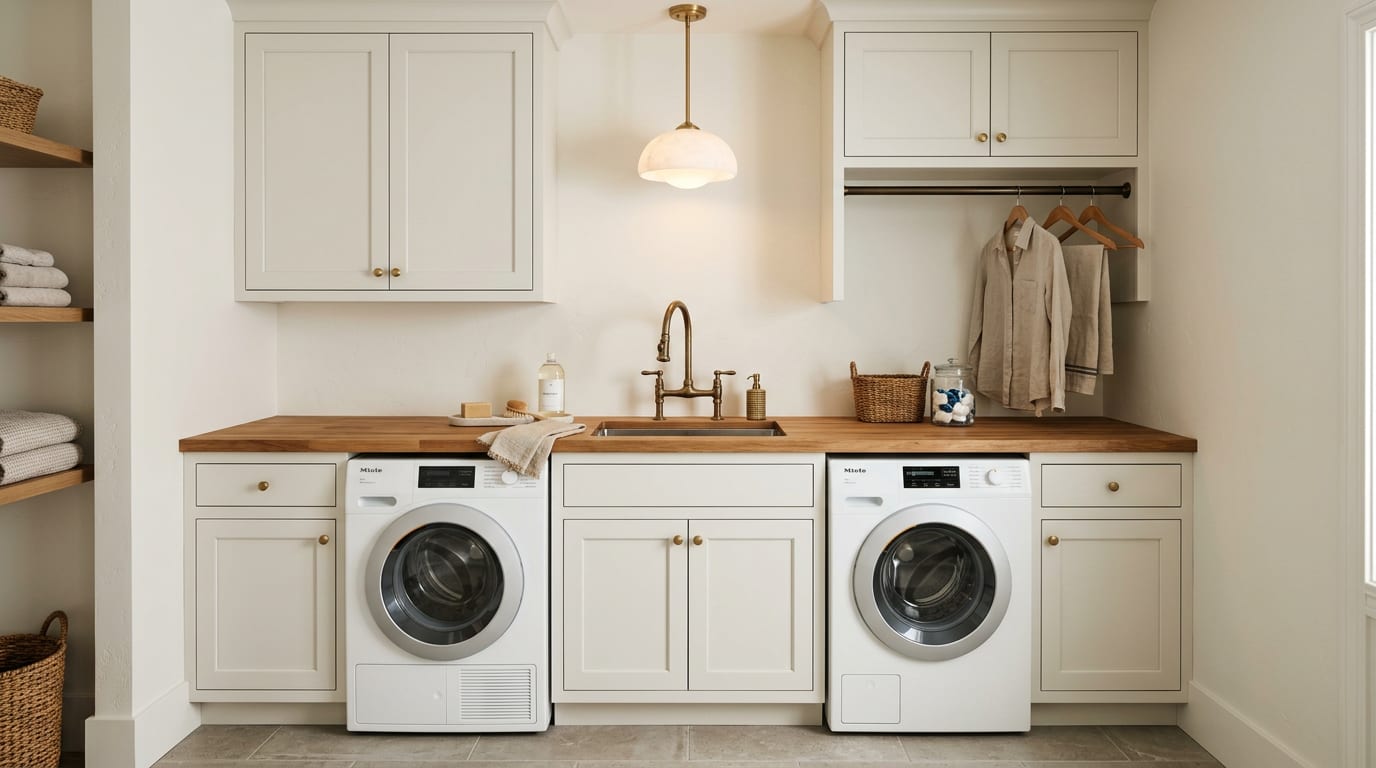
- Counter depth and counter material. A 24-inch deep counter folds full-size sheets; an 18-inch deep counter does not. AI shows the difference visually, and the version with the deeper counter is almost always the one that turns the room from a hallway into a workspace.
- Cabinet run versus open shelving. Closed uppers hide laundry detergent jugs, dryer sheets, and stain pens. Open shelves with baskets look intentional and read taller. AI shows you which one fights the appliance color and which one calms the room.
- Sink and faucet placement. A 16-inch utility sink with a pull-down faucet next to the counter changes the room's usability for hand-washing, soaking, and dog-bath duties. Preview it before you order a vanity-style sink that turns out to be too shallow.
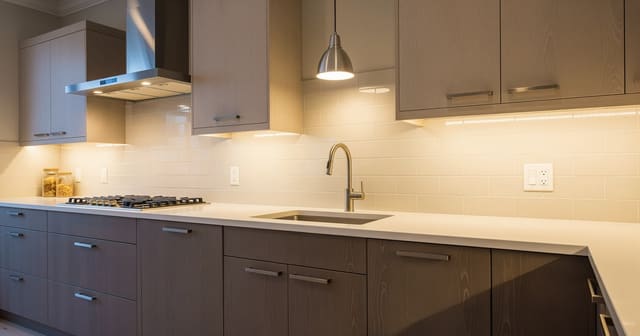
- Lighting layers in a small box. A single overhead can-light in a 6 by 9 laundry room produces a shadowed counter. AI shows the same room with under-cabinet LED tape plus a warm overhead — the difference is dramatic enough that the upgrade usually pays for itself in legibility alone. The principles in task lighting kitchen placement translate directly into a laundry-room prompt.
A few specific style moves AI handles well
- Two-tone cabinets — painted upper, walnut or oak lower — read as a small kitchen instead of a utility closet.
- Vertical bead-board behind the counter adds texture without darkening the room.
- A 12 by 24 inch porcelain tile floor in warm gray reads cleaner than a 12 by 12 sheet vinyl and survives the bleach.
- A single sculptural pendant above the folding counter pushes the room from utility to considered, the same way a lamp upgrade in a windowless bath pushes a 5 by 8 from clinical to calm.
Test this on your own room photo with ReDesign before you choose the final layout; keep the room structure, daylight, ceiling line, and main path visible so the preview solves the space you actually have.
What AI laundry room design does badly
The render is not a contract. A laundry room render that looks beautiful on screen can still fail at the install if the dimensions are wrong or the venting is hallucinated.
- Appliance proportions are routinely off. AI may render a 27-inch washer/dryer as 24-inch units to make them fit a tight cabinet bay. Verify actual appliance dimensions against the spec sheet before designing around them.
- Vent runs are usually invented. AI does not know where your existing dryer vent terminates and will render a magical clean wall behind the dryer. Lock the vent location into the prompt and check the actual venting with a contractor.
- Plumbing is hallucinated. AI may move the washer hookup three feet without telling you. Treat any plumbing change as a styling artifact, not a recommendation.
- Cabinet hardware finishes are inconsistent. Brass, matte black, and unlacquered brass each come back drawn differently across renders. Lock the finish in the prompt and confirm with the real sample in person.
- Door swing is frequently ignored. A laundry room with an inward-swinging door has less usable wall than the render shows. If the door swing matters, lock it into the prompt and re-run if the render edits it out.
How to use Re-Design for a laundry room preview
Be specific about what stays, what changes, and which constraints are non-negotiable.
Example prompt: "Keep the existing washer and dryer hookups, the dryer vent at the back wall, the window, and the door swing. Replace the existing flat counter with a 24 inch deep butcher-block counter at 36 inches above the floor, spanning from wall to wall. Add full-height painted shaker cabinets in soft white above the counter from 48 inches up to 84 inches, with a single hanging rod under the upper cabinet on the right side for drying. Replace the existing utility sink with a 16 inch deep stainless undermount sink with a pull-down faucet in unlacquered brass. Add under-cabinet LED tape at 2700K and a single 14 inch alabaster pendant centered over the counter. Tile the floor with 12 by 24 porcelain in warm gray. Repaint the walls in warm white."
Run a second version with one variable changed — for example, the same prompt with a stacked washer/dryer instead of side-by-side. The comparison usually shows whether the stacked layout earns its keep with a full cabinet bay of new storage, or whether the side-by-side is the workflow you actually want.
Save the best version, screenshot the counter depth, cabinet height, sink size, and pendant placement, and walk those notes into the cabinet quote. The preview becomes the build brief.
If the laundry room is small enough that every inch counts, pair the AI preview with the storage logic in small pantry organization — the cabinet-versus-shelf trade-offs are nearly identical.
Common AI laundry room design mistakes
- Trusting the appliance proportion in the render instead of the spec sheet — and ordering a stacked unit that does not fit the height the render promised.
- Specifying an 18-inch counter that cannot fold a sheet because the render looked spacious.
- Letting the AI invent a vent location and finding out at install that the dryer cannot go where the render put it.
- Skipping under-cabinet lighting because the render's overhead light looked sufficient on screen.
- Choosing closed upper cabinets without a hanging rod, eliminating the single most useful storage move in a small laundry.
- Forgetting to lock the door swing and ordering a base cabinet that blocks the door.
- Designing for a clean version of laundry day instead of the dog towels, sports gear, and stain pens that actually live in the room.
Use AI design to preview your laundry room before you buy cabinets
Laundry rooms reward homeowners who commit on screen before they commit on paper. Photograph the room from the doorway, lock the plumbing and venting in the prompt, change one finish or layout variable at a time, and use the comparison to decide. The cabinet quote, counter spec, and lighting plan should match the preview you saved — because the preview is the cheapest way to find out which version of the room is actually usable on a Sunday morning with three loads to fold.
For the broader upload workflow, use the AI design complete guide as the parent checklist, then return to this room-specific pass for scale, light, and layout choices.
Frequently Asked Questions
Can AI redesign a laundry room from one photo?
Yes — upload a wall or doorway photo showing the appliance hookups, ceiling, and any window; the AI tests stacked or side-by-side machines, counters, hanging rods, and sink placement while preserving plumbing, gas, and electrical positions. Treat the preview as a scale and circulation test, not a shopping command, and keep the room openings, ceiling line, daylight, and fixed storage visible in the uploaded photo.
Stacked or side-by-side washer and dryer?
Stacked when the room is under 6 ft wide or you need wall length for a folding counter; side-by-side when the room is 7+ ft wide and you can build a counter over both machines for folding and sorting. Compare the result against ordinary use: door swing, chair pullout, walkway width, storage reach, evening light, and the view from the doorway matter more than a perfect catalog angle.
How deep should a laundry room counter be?
Twenty-four inches over front-load machines if you want full folding usability; 18–20 inches if the machines are top-load; less than 18 inches becomes a shelf rather than a counter. Run one conservative version and one bolder version, then choose the concept that still works with the existing windows, trim, floor color, and furniture you are likely to keep.
Does a laundry room need a sink?
Yes when handwashing, soaking, pet baths, or boot cleaning happen in the room — a 18–25 inch utility sink earns its plumbing; skip the sink if a kitchen or bath sink is 10 ft away and only quick rinses happen. Use the image to narrow measurements and priorities before ordering anything custom; the final purchase still needs real dimensions, outlet locations, and product clearances.
What lighting works in a laundry room?
Bright cool 4000K overhead for stain spotting and sock matching, plus under-cabinet 3000K for the folding counter; one warm pendant if the room doubles as a mudroom. If the preview invents architecture or hides the awkward feature you need solved, rerun it with stricter instructions so the result remains tied to your actual room.
Ready to see this on your own room? Open Re-Design and run the preview before you buy, paint, drill, or move furniture.
Three transformations to try
1. Stacked pass with folding counter and hanging rod
2. Side-by-side pass with counter, cabinets, and utility sink
3. Laundry-mudroom combo pass with bench, hooks, and hidden machines