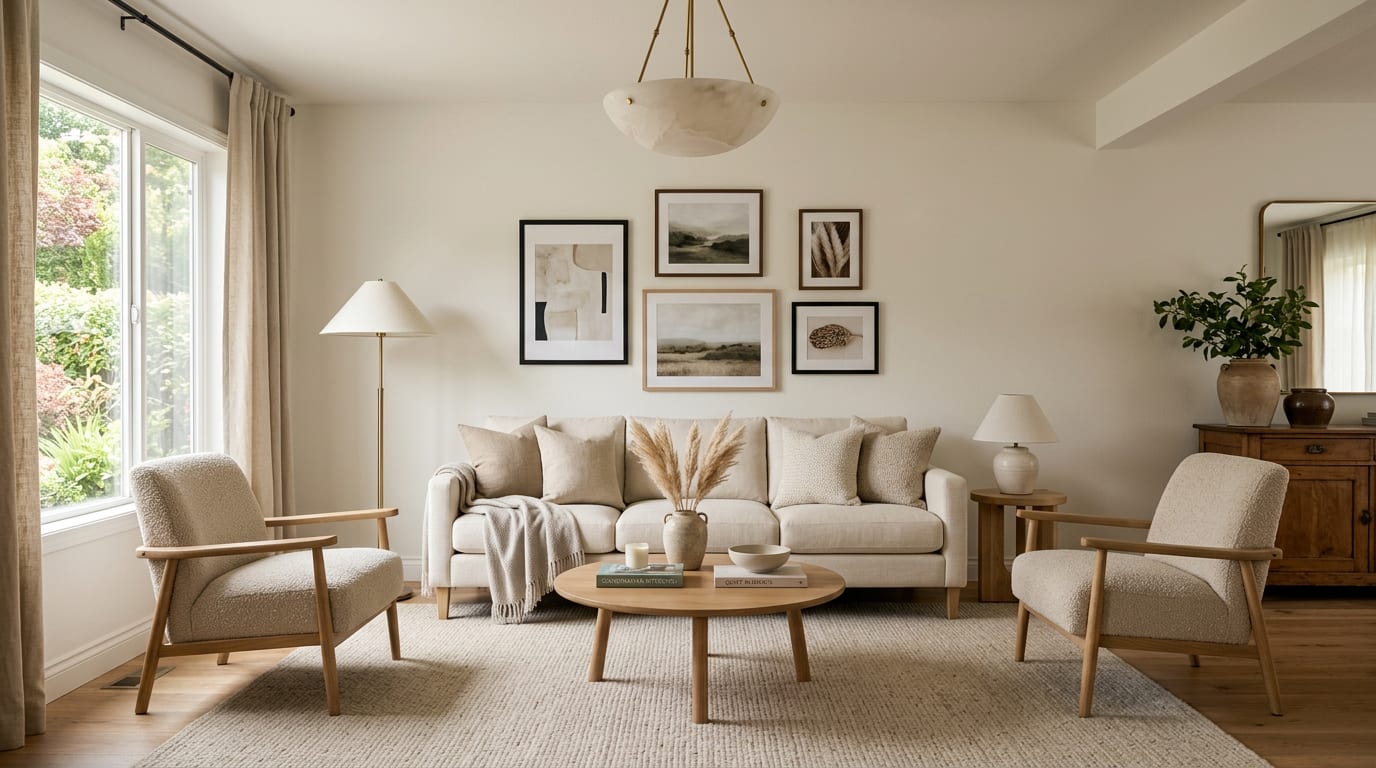
AI living room design ideas work by uploading a photo of the room, locking the focal wall and window positions, and previewing sofa orientation, rug size, and accent palette swaps before any purchase. The living room is the easiest room to over-furnish and the hardest to fix after the sofa is delivered. A 96-inch sofa that looked perfect online arrives and consumes the room; a rug that read generous in a catalog photo floats in the middle of the floor with the furniture half on, half off. My opinion is blunt: AI living room design earns its keep by answering scale questions — sofa length, rug size, chair count, ceiling fixture diameter — before the truck shows up.
How accurate is AI living room design?
AI living room design is accurate enough to drive purchase decisions when it is used for finishes, scale, and layout comparisons, and unreliable when it is used as a floor plan or a dimension oracle. The strongest workflow is to upload one wide photo from the room's longest sightline, then run versions that vary the sofa style, rug size, or lighting plan one at a time. The render gets the proportional relationships right — what dominates the room, what disappears, what calms the wall opposite the entry — while the manufacturer's spec sheet decides the actual inches. Treat AI as a visual comparison tool, not a measurement service, and the accuracy is more than enough to commit on.
What AI living room design does well
Sofa scale is the single biggest decision in any living room, and AI is excellent at previewing it. A 72-inch loveseat, an 84-inch standard sofa, and a 96-inch deep-seat sectional all change the room's center of gravity. Test all three against your real wall before paying for delivery; the comparison usually narrows the choice to one within minutes.
Rug size is the test most homeowners fail. A rug should sit under at least the front legs of every major seating piece, and ideally cover the conversation area to within 12 to 18 inches of the wall. AI shows you a too-small 5x7 versus a properly sized 8x10 versus a generous 9x12 in your actual room, and the version that anchors the seating is the right one. The rules from area rug sizing mistakes translate cleanly into the prompt.
Chair count and placement is where awkward layouts get solved. Two accent chairs facing the sofa, a single bergère opposite a love seat, or a pair of swivels on the rug edge each carry the room differently. AI shows the foot traffic implications without you having to walk it. If your room has a tricky shape or a fireplace in the wrong place, the moves in awkward living room layouts work better when you can see them in your actual photo.
Lighting layers are the biggest perceived-quality win. A living room running on one overhead is flat; the same room with a floor lamp, a pair of table lamps, a picture light, and a dimmer reads as a designed space. AI can render the difference between a single can-light and a four-source layered plan, and the comparison usually sells the upgrade. For the underlying logic, the layering rules in layer lighting living room carry over directly.
Wall color and trim color are easy to fake and easy to ruin. Run versions in warm white, soft greige, a saturated accent wall behind the sofa, and a moody full-saturation wrap. The version that holds across morning and evening light is usually the one to trust.
Test this on your own room photo with ReDesign before you choose the final direction; keep the doorway, walls, windows, main furniture, lighting, and awkward fixed features visible so the preview solves the room you actually have.
What AI living room design does badly
Sofa dimensions in the render do not match the spec sheet. AI may shrink a 96-inch sectional to look like an 84-inch standard sofa, or stretch a 72-inch love seat into a banquette. Always cross-check the actual dimensions against your wall before ordering. The render is a sketch; the manufacturer measurement is the contract.
Coffee-table proportion is reliably wrong. AI may render a coffee table that is two-thirds the length of the sofa when the real piece is half. Verify the table length, depth, and clearance against your real seating. A coffee table that is too small or too far from the sofa breaks the conversation area no matter how good the styling looks.
Lamps are often invented. The render may show a 28-inch lamp on a side table that physically cannot support a base wider than 8 inches, or a floor lamp that intrudes on the door swing. Treat lamp placements as suggestions, not specifications.
Built-ins, fireplace mantels, and window trim are frequent hallucinations. AI may invent a built-in bookshelf on a blank wall or alter the mantel profile. If you are using the preview to plan around real architecture, lock those features into the prompt and re-run if the render edits them out.
TV size and placement is wildly inconsistent. AI may render a 75-inch TV at 36 inches off the floor when the real wall needs the center at 48 inches for comfortable viewing. Use the preview for placement zone, not exact height.
How to use Re-Design for a living-room preview
Be specific about what stays and what changes. The living room is large enough that a generic prompt produces a generic answer.
Example prompt: "Keep the existing fireplace, window placement, and wood floor. Replace the sofa with an 84 inch performance-fabric three-seater in warm cream. Add two club chairs in a textured oat upholstery facing the sofa. Add a 9x12 wool rug with a low-pile flatweave in soft natural. Add a pair of 28 inch ceramic table lamps with linen shades on the side tables, plus a 65 inch floor lamp by the reading chair. Hang two framed pieces above the sofa, centered, total width 60 inches. Repaint the walls in warm white. Replace the existing flush mount with a 24 inch alabaster pendant centered over the rug."
Run a second version with one variable changed — for example, swap the 84-inch sofa for a 96-inch sectional with a chaise. The comparison will show whether the sectional is doing the calming work or destroying the walking path.
Save the best version, screenshot the sofa length, rug size, lamp height, and pendant diameter, and walk those notes into the showroom. The preview becomes the shopping brief that prevents a 96-inch return.
If the room is small to start with, the small-space tricks in small living room tricks translate well; let the AI preview show you which moves actually work in your specific footprint.
Common AI living-room design mistakes
- Trusting the sofa proportion in the render instead of the manufacturer's spec sheet.
- Ordering a rug from the preview that turns out to be 5x7 when an 8x10 is needed.
- Letting the AI place lamps and assuming the side tables can hold them.
- Running one preview instead of two or three with one variable changed.
- Cropping the doorway or the adjoining room out of the photo so the layout ignores foot traffic.
- Forgetting to lock the window treatment in the prompt; AI may invent or remove curtains.
- Buying a sectional from a render without measuring the doorway it has to come through.
Use AI design to preview your living room before you buy a sofa
Living rooms reward decisions made on screen instead of on the loading dock. Photograph the room from the longest sightline, lock the room's bones in the prompt, change one variable at a time, and use the comparison to commit. The sofa that ends up in the room should be the one that fit best in three previews — not the one the catalog promised would.
Frequently Asked Questions
Can AI rearrange my living room without buying anything?
Yes — AI previews sofa, chair, and rug orientation swaps against the existing focal wall; use the preview to decide which rearrangement to try before moving heavy furniture. Use the room photo to compare the visible layout and fixed constraints before committing, because door swings, windows, outlets, storage reach, circulation, and existing furniture decide whether the idea survives daily use.
How does AI handle an awkward living room shape?
Long-narrow and corner-fireplace living rooms get diagonal sofa angles or floating-sofa layouts in AI previews; the model routes against the focal wall and traffic path the photo shows. Keep the preview honest by leaving the problem area visible in the frame, then compare one conservative version against one bolder version before you buy lighting, paint, furniture, or storage.
Can AI preview a sectional vs two-sofa layout?
Yes — preview a sectional against the focal wall (one big visual block) vs two sofas at right angles (more flexible, more visual seams); use the photo to compare scale and traffic flow. Check the result against ordinary movement first: drawer clearance, chair pullout, walkway width, glare, switch access, and sightlines matter more than a perfect catalog angle.
What rug size does AI typically suggest for a living room?
For a sofa wall under 8 feet, AI suggests 8x10 with front legs on the rug; for 8-10 feet, 9x12 with all sofa legs on the rug; for over 10 feet, 10x14 with all furniture legs on the rug. Use the image to narrow priorities and measurements before ordering anything custom; final purchases still need real dimensions, outlet locations, installation limits, and product clearances.
Should AI ideas drive a single big purchase or many small ones?
Use AI to lock in the sofa size and rug size first (those drive scale), then layer in accent chair, lamps, and pillows; reversing the order usually leads to a sofa that fights the rug or a rug that swims. If the preview invents architecture or hides the awkward feature you need solved, rerun it with stricter instructions so the result remains tied to your actual room.
> Try this: Ready to see this on your own room? Open ReDesign and run the preview.
Three transformations to try
1. Sofa against focal wall with 9x12 rug under all legs 2. Two sofas at right angles around fireplace 3. Sectional vs L-shape comparison in same room


