A home office lights for focus when the three layers are present — ambient overhead at 3000K with CRI 90+, task lamp at 3000K aimed across the work surface (not at the monitor), and warm 2700K corner accent so the eye relaxes between focused stretches — single overhead light alone causes glare on the monitor and shadows on paper, both of which fatigue the eye within an hour. A home office lit with one overhead and a screen is an eye-strain factory. By 3 p.m. most days the headache starts; by 9 p.m. you can't focus. The fix isn't a more expensive monitor — it's a four-zone lighting plan that balances screen brightness against ambient room brightness and removes the harsh contrast your eyes are fighting all day. Get the zones and the Kelvin right and you can work past sunset without burning out.
How should I light a home office to avoid eye strain?
Light a home office to avoid eye strain with four zones: ambient overhead at 3000K–3500K, a monitor bias light strip behind the screen at 6500K (yes, cooler — counterintuitively right), a desk task lamp at 3000K–4000K positioned to avoid glare on the screen, and an accent or floor lamp for the room. The biggest cause of eye strain is the contrast ratio between bright screen and dark room — fix the contrast before you blame the monitor.
Why home office Kelvin is different from the rest of the house
Living rooms, bedrooms, and dining rooms all want 2700K because they're winding down. A home office is the only room where slightly cooler light is appropriate during the workday because it supports alertness and matches average daylight color temperature. The rules:
- Ambient overhead: 3000K–3500K. Crisp enough for daytime focus, warm enough not to feel commercial.
- Desk task lamp: 3000K–4000K. A bit cooler than ambient. The cooler tone keeps the page in front of you sharp.
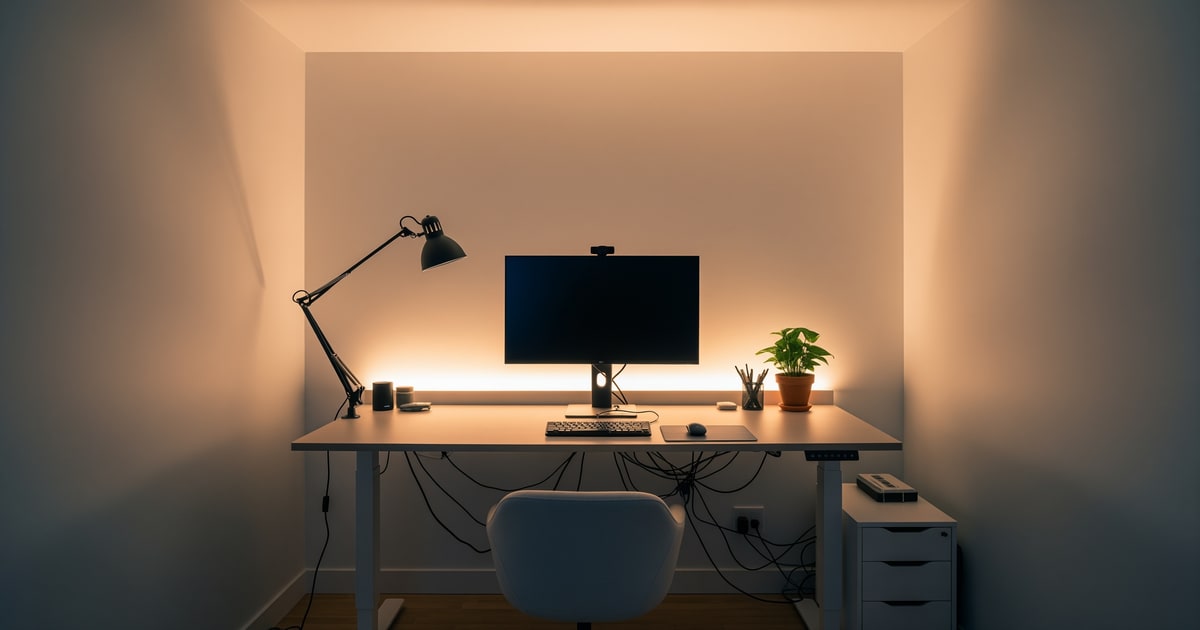
- Monitor bias light: 6500K. Yes, daylight cool. The bias light is meant to match the average color temperature of your monitor so the contrast around the screen edge disappears.
- Accent or floor lamp: 2700K for evening reset. When work ends, run the accent at full and the others at 50% to signal the day is done.
Test this on your own room photo with ReDesign before you choose the final direction; keep the doorway, walls, windows, main furniture, lighting, and awkward fixed features visible so the preview solves the room you actually have.
The monitor bias light (the biggest underrated upgrade)
A monitor bias light is a 6500K LED strip mounted to the back of your monitor that lights the wall behind the screen. This single fixture reduces eye strain more than any other change in the room.
- Why it works. Your pupils constantly adjust between bright screen and dark wall behind it. The contrast drives fatigue. A bias light brings up the wall brightness so your pupils stop dilating and contracting.
- What to buy. A USB-powered 5500K–6500K LED strip 12"–24" long. MediaLight, Antlux, or Govee all make versions. ~$15–$40.
- Mount it. Adhesive on the back of the monitor, cord tucked behind the desk. Five-minute install.
- Calibrate. The strip should match your monitor's white point. Most are pre-calibrated to D65 (6500K) which is what 95% of monitors use.
Desk lamp positioning (where the glare problem lives)
A desk lamp helps focus but only if positioned to avoid bouncing into your screen.
- For right-handed users, put the lamp on the left. Casts shadow away from the writing hand. Reverse for left-handed.
- Bottom of the shade or lens at 18"–22" above the desk surface.
- Articulating arm (BenQ ScreenBar, IKEA Tertial, Humanscale Element) preferred. Lets you adjust beam direction so it stays off the screen.
- Monitor light bar. A clamp-on LED bar that mounts to the top of the monitor and lights down at the desk surface without glare. BenQ ScreenBar Plus and Halo are the gold standard. ~$100–$200.
- 2700K is wrong here. Too warm for sustained reading. Stay 3000K–4000K.
Ambient lighting that doesn't trigger headaches
Most home office headaches come from one ceiling fixture, cool-white, no diffuser, no dimmer, no other layer in the room.
- Add a second light source even if you have an overhead. A floor lamp or table lamp adds a second pupil-friendly height.
- Diffused fixtures only. A bare-bulb dome triggers more glare than any other fixture type. Replace with a flush-mount with a diffuser.
- Indirect light is better than direct. A torchiere lamp aimed at the ceiling bounces light evenly back into the room with no hot spots.
- Dimmer required. Late-afternoon focus needs different intensity than morning email.
Window strategy (manage glare, don't eliminate daylight)
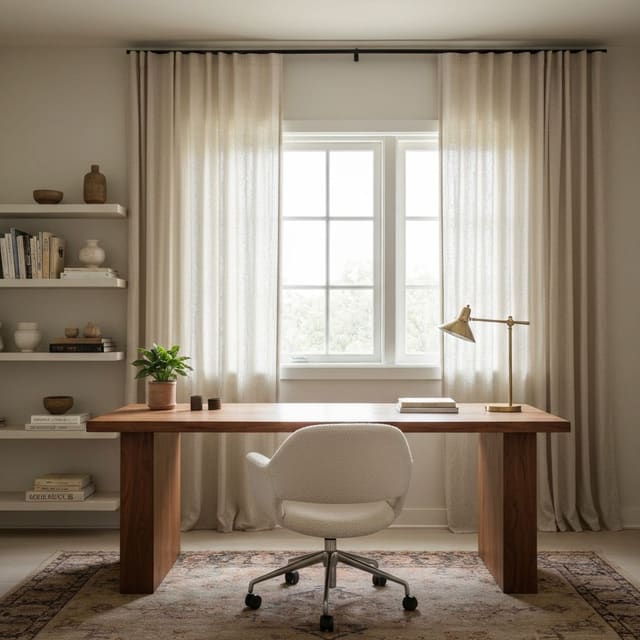
- Position the desk perpendicular to the window, not facing it or backing it. Facing the window: glare on your face. Backing the window: glare on the screen.
- Sheer linen curtains filter direct sun without killing daylight.
- Avoid blackout curtains during work hours. The most common mistake — owners block all daylight to fight screen glare, then the room feels like a bunker.
- For unfixable backlight situations (desk has to face the window), get a vertically adjustable curtain that drops only the top half of the window during the worst light hours.
The office needs two different temperatures without looking confused. Keep the room layer warm-neutral, around 3000K, then use a desk lamp or monitor light at 3500K to 4000K for focus if your eyes prefer it. A bias light behind the monitor should sit at roughly 10 percent of the monitor brightness, just enough to soften the contrast between screen and wall. Products like a BenQ ScreenBar, a shaded articulating lamp, or a slim LED bar work because they light the work plane without reflecting in the screen. If the desk lives in a shared room, the boundary ideas in living room office zones matter as much as the bulb.
Put the lamp on the opposite side of your writing hand so your hand does not cast a shadow across paper or a keyboard. Keep the shade below eye level when seated, and avoid bare Edison bulbs anywhere in your peripheral vision. Owners can add a switched outlet or wall sconce over the desk; renters can use a clamp lamp, adhesive cable raceway, and smart plug. If the office is a converted closet, the same glare problem is harsher because walls are close, so borrow the shallower fixture strategy from walk-in closet office ideas.
Common home-office lighting mistakes
- One overhead, nothing else. Default. Eye-strain factory.
- 2700K everywhere. Too warm for sustained screen work.
- No monitor bias light. Free productivity upgrade most people don't know about.
- Desk lamp casting shadow on the writing hand. Lamp on wrong side.
- Bare-bulb domes overhead. Glare source. Replace.
- Working in a dark room with only the screen lit. Maximum contrast = maximum strain.
- Cool-white floor lamps trying to "energize" the room. Read commercial.
- Lighting your face and work surface from the same angle. A call light aimed at your face can bounce off a monitor or glossy desk. Separate the work beam from the video-call fill.
- Putting the brightest lamp behind the monitor. Backlight without task light raises contrast problems instead of solving eye strain.
Use AI design to preview your office lit for focus
A photo of an over-lit, eye-straining office is the easiest "before" picture you'll ever take. AI design lets you preview the four-zone version — bias light, monitor bar, ambient at the right Kelvin, accent — alongside the current room in minutes. The preview is what justifies the $200 of lighting upgrades that will pay back in fewer headaches by week two.
Frequently Asked Questions
What is the best desk lamp for a home office?
A 3000K LED task lamp at 800 to 1,200 lumens with adjustable arm and dimmer covers paper, hand work, and detail focus; below 600 lumens the lamp falls short for sustained focus. Use the room photo to compare the visible layout and fixed constraints before committing, because door swings, windows, outlets, storage reach, circulation, and existing furniture decide whether the idea survives daily use.
Should the home office have overhead lights?
Yes — a 3000K recessed can or warm flush mount handles ambient so the desk lamp is not the only light source; pure desk-lamp setups leave the room and your eyes in chronic contrast strain. Keep the preview honest by leaving the problem area visible in the frame, then compare one conservative version against one bolder version before you buy lighting, paint, furniture, or storage.
How do I reduce monitor glare?
Place the monitor 90° to the brightest window or wall, point the desk lamp across the work surface (not at the monitor face), and add a matte screen protector or an anti-glare overhead diffuser if glare persists. Check the result against ordinary movement first: drawer clearance, chair pullout, walkway width, glare, switch access, and sightlines matter more than a perfect catalog angle.
What color temperature works for video calls?
3000K with CRI 90+ across all light sources reads skin accurately on camera; mixed color temperatures (3000K overhead, 4000K key light, 2700K accent) muddy the face. Use the image to narrow priorities and measurements before ordering anything custom; final purchases still need real dimensions, outlet locations, installation limits, and product clearances.
Are smart bulbs worth it in a home office?
Yes — scheduled scenes shift the office from energized morning (cooler 3500K, brighter) to relaxed evening (warmer 2700K, dimmer) automatically; manual switching rarely happens consistently. If the preview invents architecture or hides the awkward feature you need solved, rerun it with stricter instructions so the result remains tied to your actual room.
> Try this: Ready to see this on your own room? Open ReDesign and run the preview.
Three transformations to try
1. Layered three-source home office lighting 2. Task lamp plus daylight window office 3. Smart-bulb scene-shift home office